Admin Portal
The admin portal is a static operator console embedded in gateway-api. It is served from the control listener at /admin-ui and calls the same /admin-ui/admin/* APIs used by automation.
For a current-branch tour of the current Admin UI 2.0 redesign and related governance, provider intelligence, usage analytics, and supply-chain features, see Current Feature Highlights.
Frontend Source
Admin UI 2.0 source files live in
crates/gateway-api/admin-ui. Build the Vite/TypeScript source into the static
assets embedded by gateway-api with:
npm ci
npm run build:admin-ui
The generated files remain checked in under
crates/gateway-api/src/static/admin-ui so the Rust control-plane binary can
serve /admin-ui, /admin-ui/app.js, and /admin-ui/app.css without a
separate frontend deployment.
The v0.1.26 Admin UI 2.0 shell uses the Aurora Teal visual system and groups
operator work into Monitor, Discover, and Govern navigation domains. Monitor
contains the live operational Overview, health, usage, and debug workflows;
Discover contains providers, services, routes, and projects; Govern contains
keys, guardrails, audit, and settings. Hash-backed navigation supports deep
links and browser history without changing the /admin-ui server route.
Command navigation and governed-change shortcuts help operators move directly
to common workflows, while responsive drawer navigation and accessible dialogs
preserve the same capabilities on narrower screens. The source package owns
design-system tokens, view metadata, templates, and reusable components, while
the generated asset paths stay stable for deployed gateways.
The service-owner workspace includes an incident chart for error rate and P95 latency, bounded upstream service-version observations, all-request outcome and status-code filters, offset pagination, and an accessible request-details drawer. Owner details remain exact-service scoped and contain only sanitized usage metadata plus an optional redacted debug bundle.
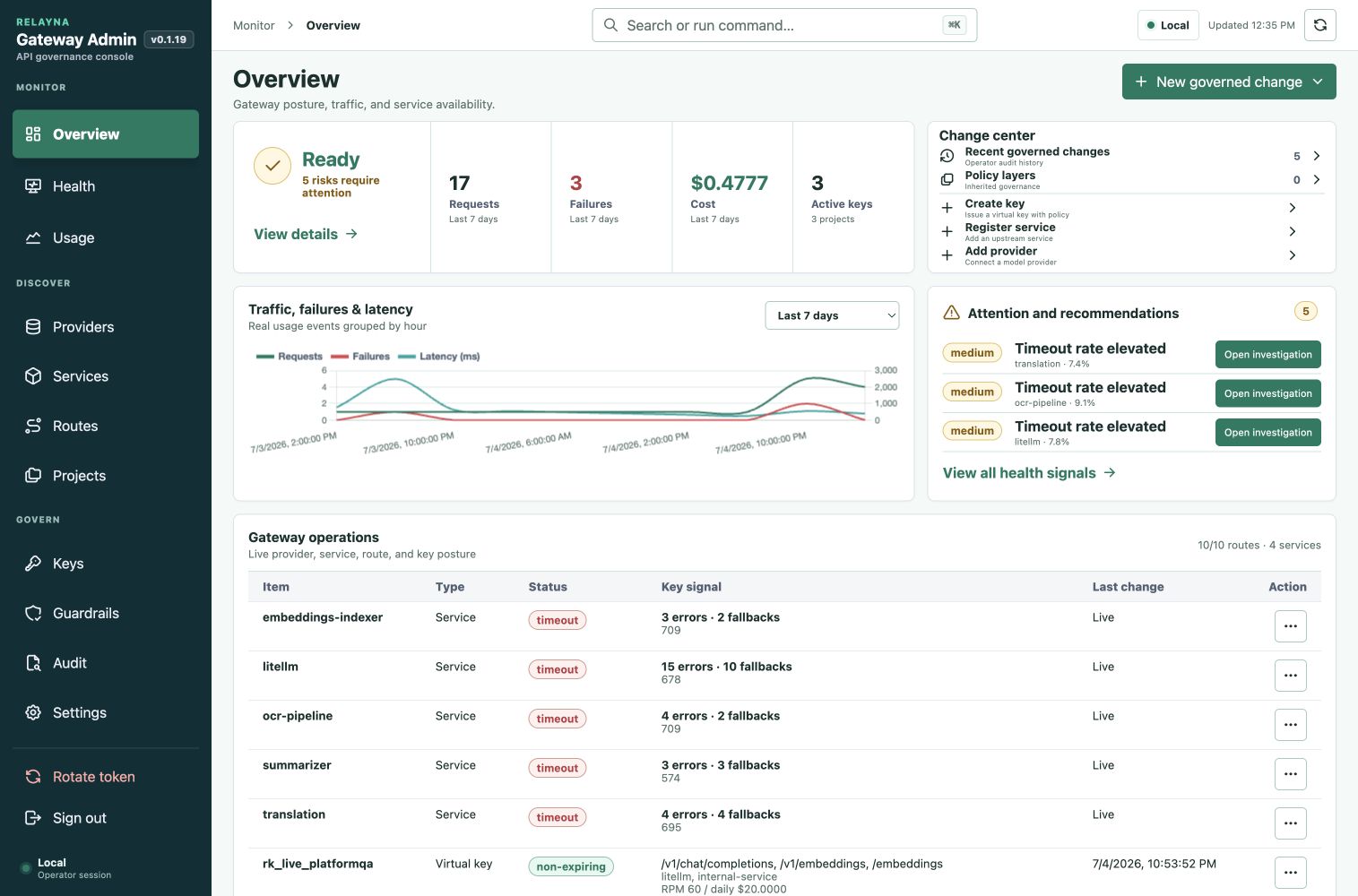
On narrow screens, the same Monitor, Discover, and Govern structure moves into an accessible drawer without removing operator workflows.
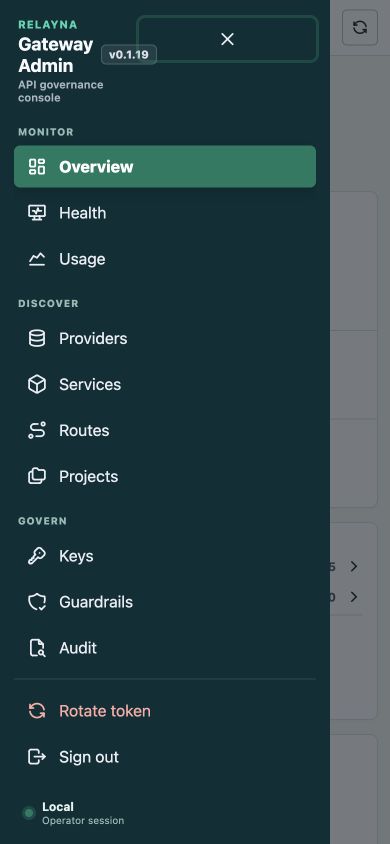
Authentication
Normal human access can use Microsoft Entra through the portal's confidential OIDC BFF flow. Entra tokens stay server-side and the browser receives an opaque HttpOnly session cookie. Relayna portal roles and service memberships determine whether the user sees the administrator console or only their assigned service dashboards. Cookie-authenticated mutations require the session-bound CSRF token returned by the portal session API.
The operator token seeded by GATEWAY_ADMIN_TOKEN, or the generated token
printed when no env token was set, remains available from Emergency operator
access and is sent as:
Authorization: Bearer <operator-token>
Use this break-glass path to approve the first Entra administrator or recover when the identity provider is unavailable. Rotate the token from the portal after bootstrap or whenever access changes. Rotation returns the new raw token once.
Operator tokens are bound to roles and scopes in PostgreSQL. Bootstrap and
rotated owner tokens keep the existing op_live_ token format and receive role
owner with wildcard scope *. Scoped operators may be limited to capability
strings such as keys:create, keys:disable, policies:update,
guardrails:update, usage:read, usage:export, providers:update,
services:update, settings:update, operators:manage, and audit:read.
Admin APIs return insufficient_operator_scope when a valid token lacks the
required scope.
For OIDC configuration, member approval, service assignment, workload identities, and local development personas, see Entra Portal and Service-owner Monitoring.
First-Time Admin Setup Manual
Use this walkthrough after Relayna Gateway is installed, PostgreSQL and Redis
are reachable, and the control listener is serving /admin-ui. It shows the
recommended first setup order for an admin who needs to make the portal usable
for one application or team.
The screenshots use the real Admin UI with demo values. Do not paste real provider keys, service credentials, operator tokens, or raw virtual keys into screenshots, tickets, or shared documents.
1. Sign in to the Admin portal
Open the control-plane URL in a browser:
http://127.0.0.1:8081/admin-ui
Sign in with Microsoft Entra when an administrator membership already exists.
For the first administrator, expand Emergency operator access and enter the
bootstrap token from GATEWAY_ADMIN_TOKEN or the token printed on first
startup. Use Members to approve the Entra identity and grant the Admin role,
then return to Entra for normal access.
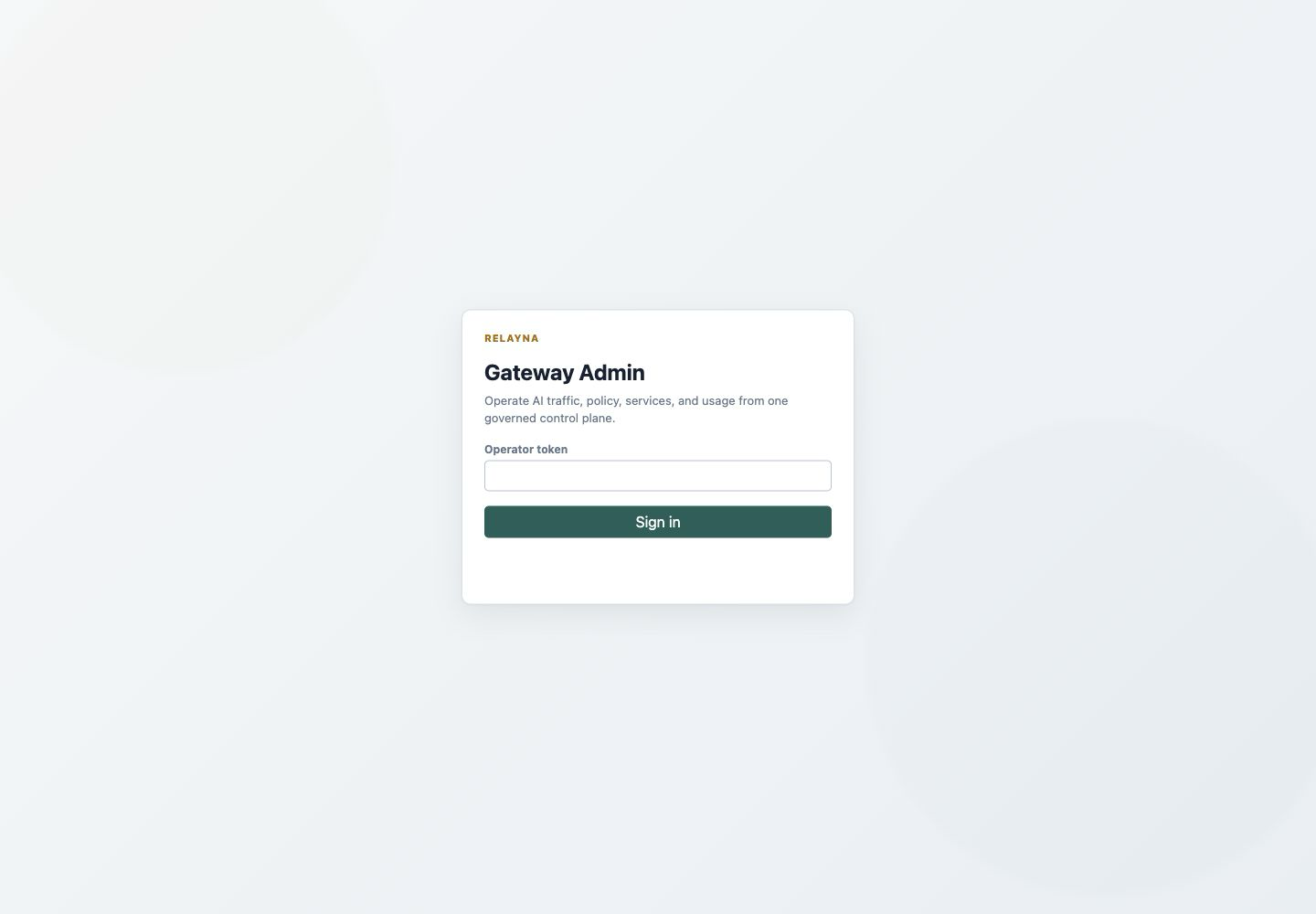
What to check: the URL is the control-plane /admin-ui path, Microsoft sign-in
is the primary action when configured, and the operator-token field stays
collapsed under emergency access. Keep the operator token private.
2. Check Overview and readiness
After sign-in, start on Overview. Confirm Readiness is ready, OpenAI routes
are enabled as expected, and the active key/service counts match a fresh or
existing installation.
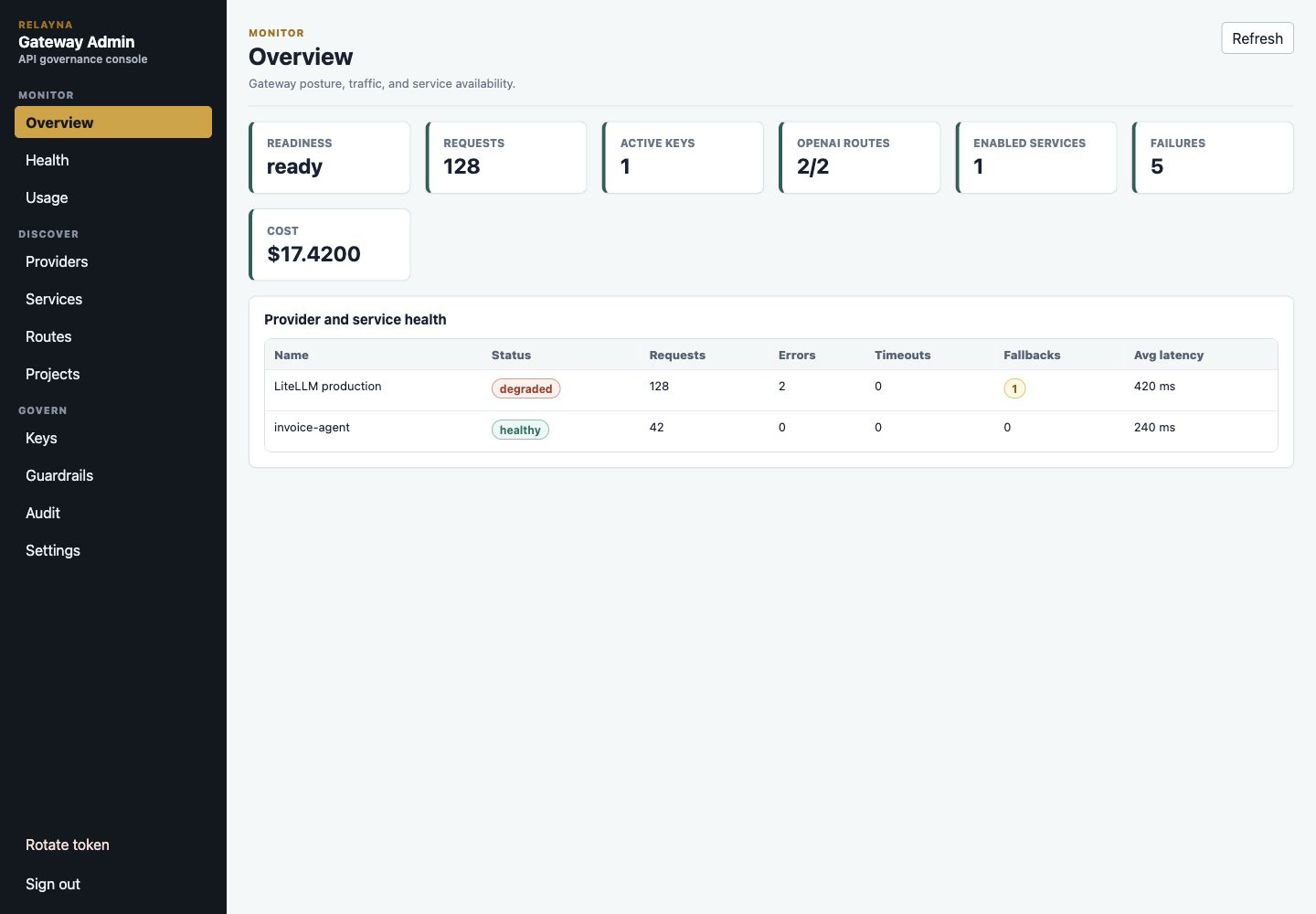
What to check: readiness must be healthy before setup. If it is not ready, verify the database, Redis, and deployment configuration before creating providers, services, projects, or keys.
3. Configure the Studio connection when imports are used
Open Settings. If Relayna Studio will provide service catalog entries, set the Studio backend base URL and optional bearer token. Use the backend URL, not the Studio frontend URL.
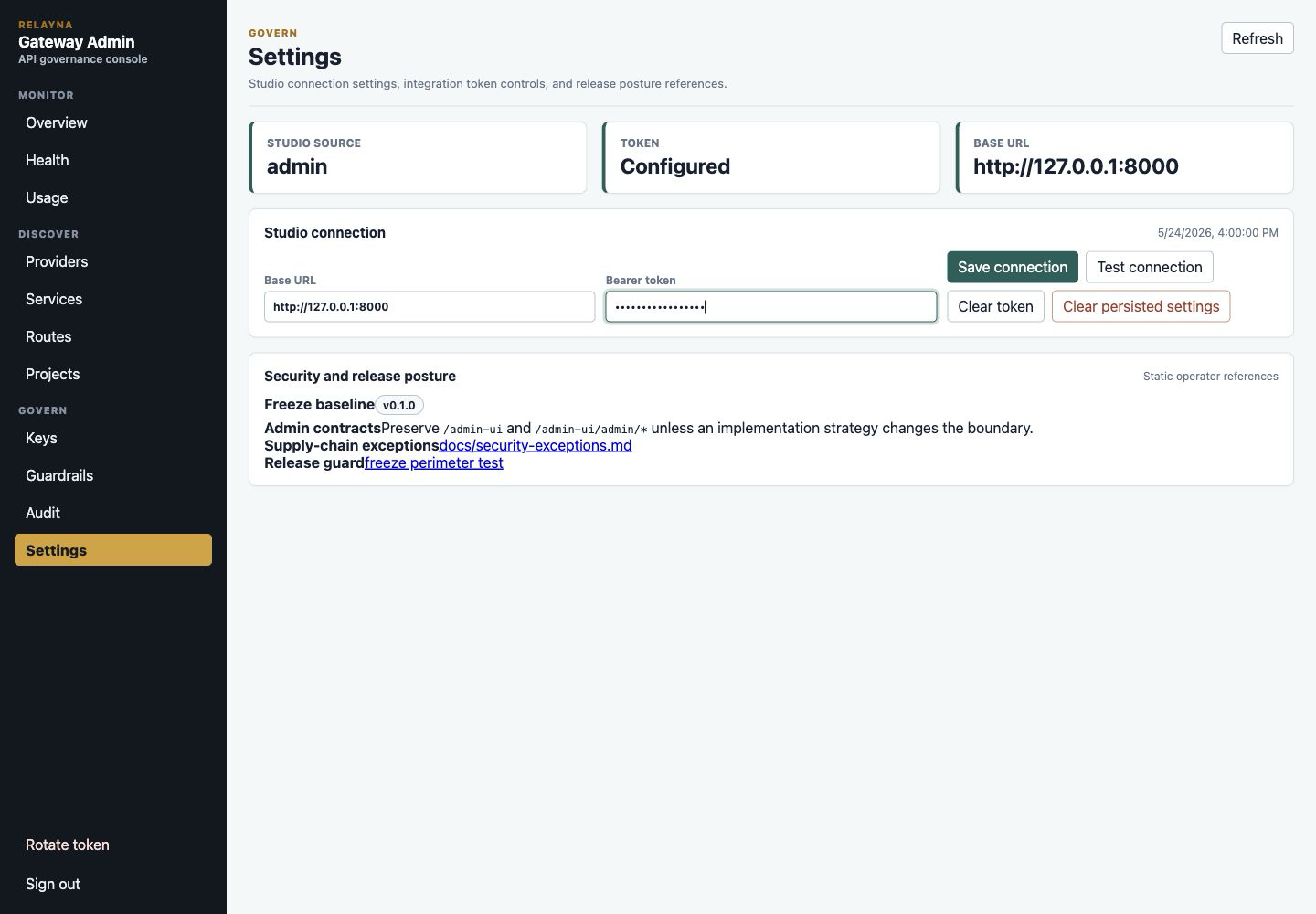
What to check: the token field is write-only. Save the connection, then use
Test connection to confirm the gateway can read Studio services. If your
deployment does not use Studio imports, leave these fields unset and create
services manually.
4. Create the provider configuration
Open Providers and create the upstream provider entry. For a LiteLLM-backed
installation, choose litellm, set the LiteLLM base URL, enter the write-only
service credential, and keep the provider enabled.
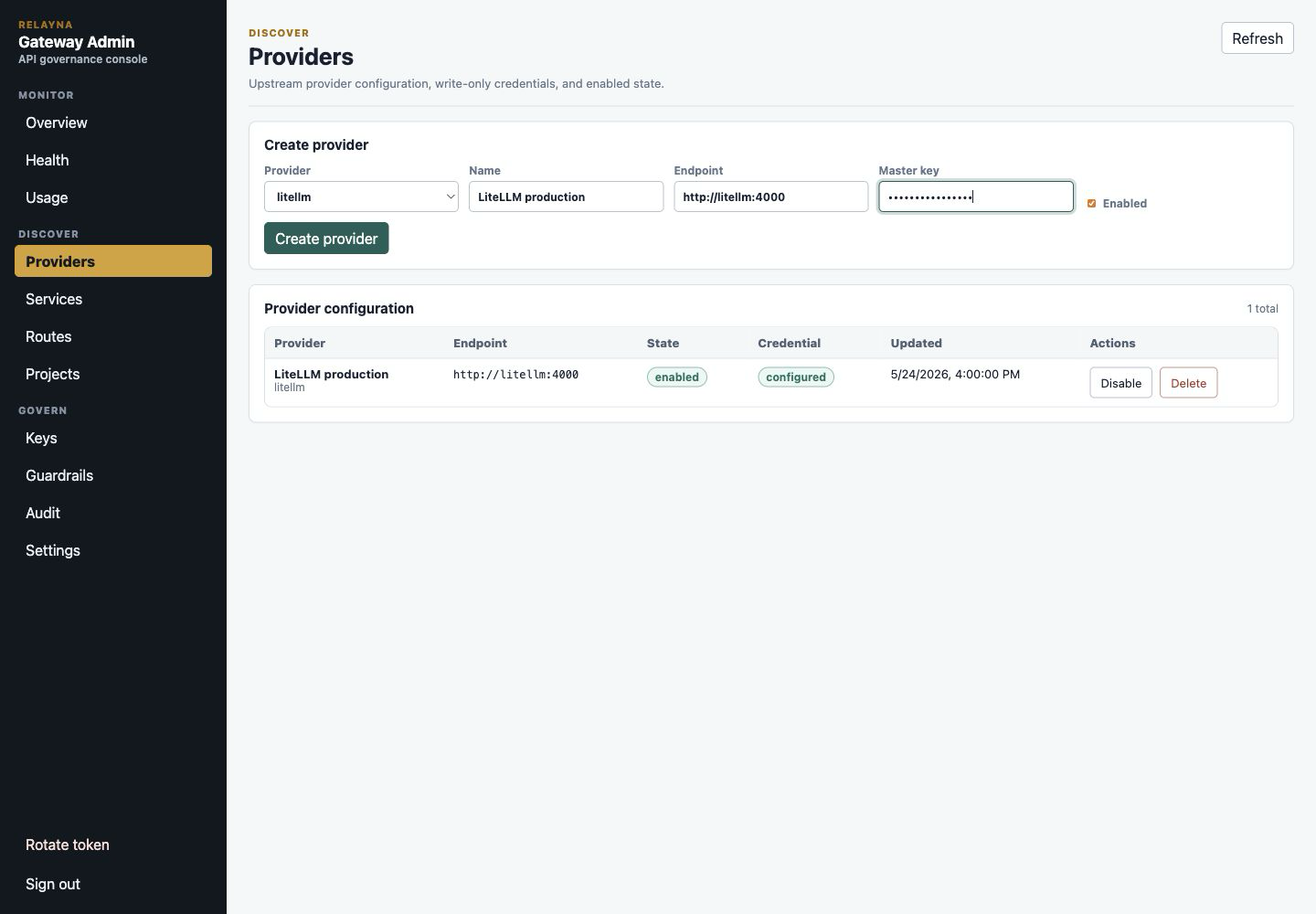
What to check: after saving, the provider row should show enabled and
configured. The portal should never show the credential value again.
LiteLLM custom header and virtual-key mapping
LiteLLM provider rows also control how Gateway authenticates to LiteLLM. Leave
Credential mode as authorization_bearer when LiteLLM expects
Authorization: Bearer <key>. Choose custom_header when production LiteLLM
or an API gateway in front of LiteLLM expects a different header, such as
x-litellm-api-key.
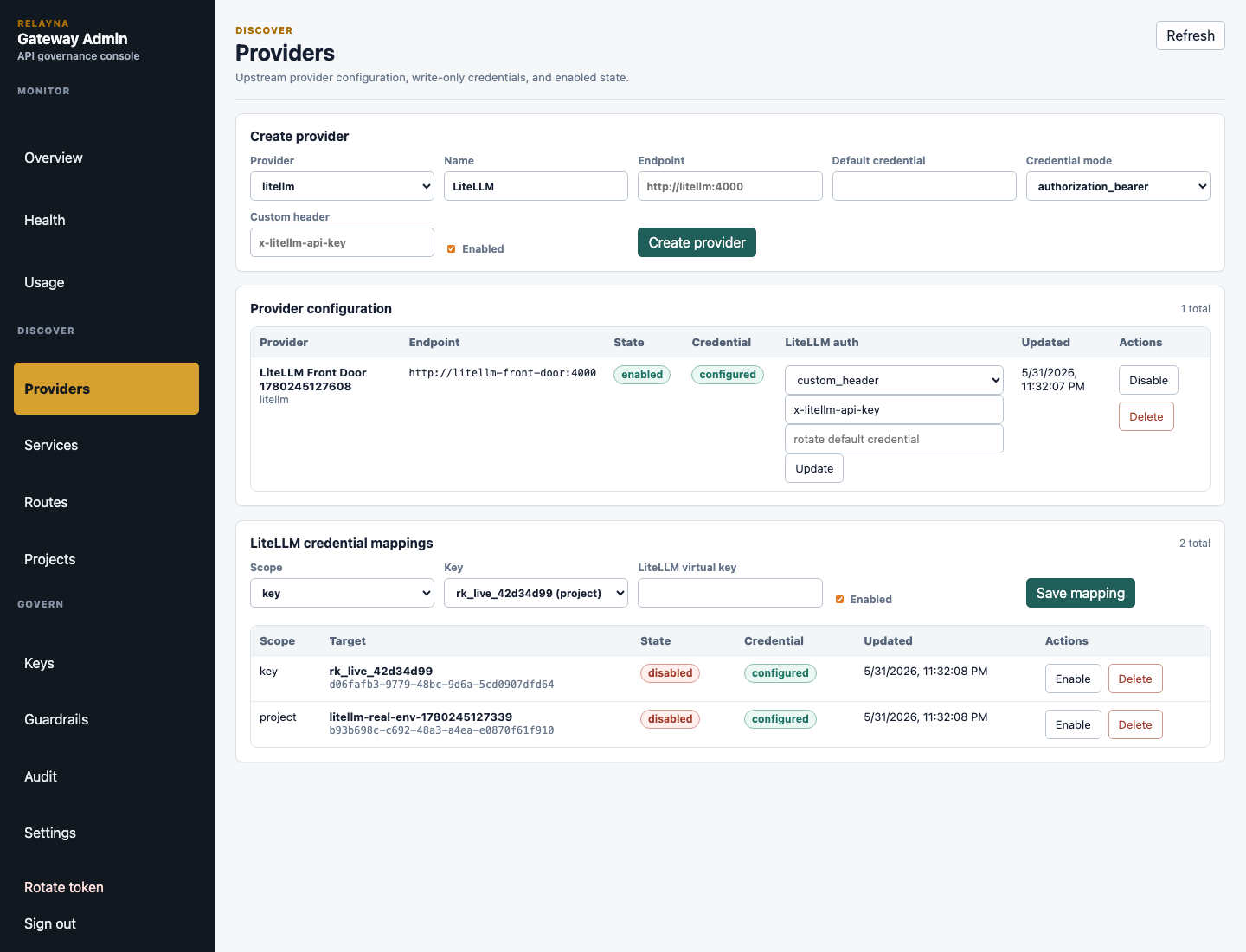
When custom_header is selected, enter the header name in Custom header and
choose how Gateway formats the header value. Use raw for headers such as
x-litellm-api-key: <key>. Use bearer for LiteLLM deployments that require
x-litellm-key: Bearer <key>. Gateway sends only that configured header to
LiteLLM for the selected internal credential; it does not send Authorization
in custom-header mode. Header names are validated as HTTP header names and
reject sensitive or conflicting names such as host, content-length,
authorization, Relayna key headers, Apigee proof headers, and proxy auth
headers.
Use LiteLLM credential mappings when different Relayna keys or projects
should use different LiteLLM virtual keys:
- Choose
keyscope to map one Relayna virtual key to one LiteLLM virtual key, or chooseprojectscope to map all Relayna keys in a project to one LiteLLM virtual key. - Select the target key or project.
- Paste the LiteLLM virtual key into the write-only
LiteLLM virtual keyfield. - Keep
Enabledchecked and save the mapping.
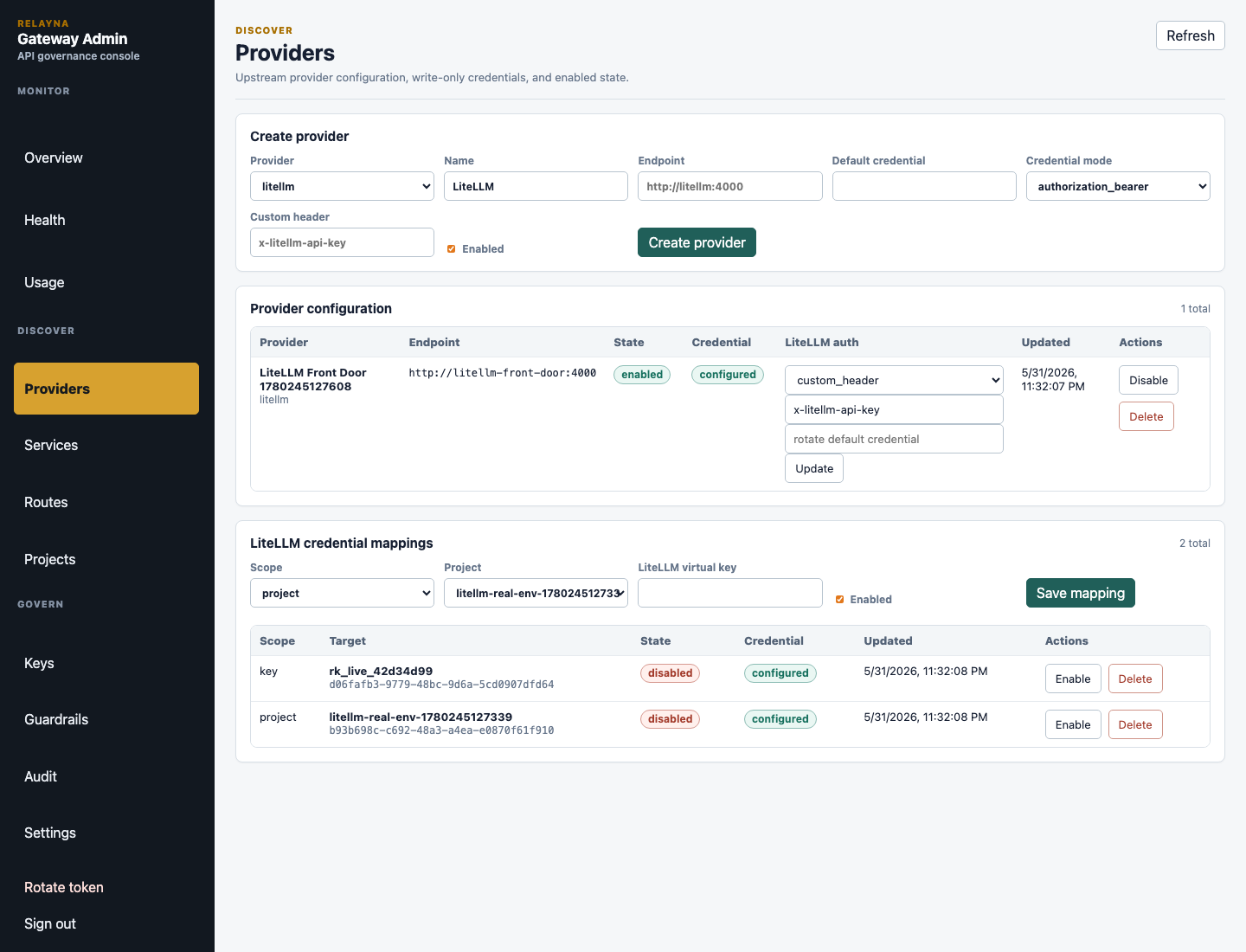
Runtime precedence is key mapping, then project mapping, then the active
LiteLLM provider default credential. If no active provider config exists,
Gateway uses the LITELLM_SERVICE_KEY startup fallback. Disabled mappings are
skipped and fall back to the next level. The portal shows mapping state and
whether a credential is configured, but never renders LiteLLM virtual-key
secret values after save.
LiteLLM wildcard passthrough settings
The same Providers view includes the LiteLLM passthrough panel. Use this
panel when Relayna Gateway should be the public ingress in front of LiteLLM for
LiteLLM-compatible endpoints beyond the canonical generation routes.
Fields:
| Field | Meaning |
|---|---|
| Enable wildcard passthrough | Turns on fallback routing for unmatched LiteLLM-bound paths. Relayna-owned service/control routes and canonical OpenAI route matching still take precedence. |
| Allowed paths | Comma-separated allowlist such as /v1/*. Add sensitive paths like /ui and /ui/* only when you have chosen an exposure mode and ingress auth pattern intentionally. |
| Allowed methods | Comma-separated methods, usually GET,POST. |
| Timeout ms | Upstream timeout for wildcard LiteLLM passthrough. Default 120000, maximum 600000. |
| Max request bytes | Request payload cap for wildcard passthrough. Default 1048576, maximum 104857600. |
| Max response bytes | Response payload cap for wildcard passthrough. Default 1048576, maximum 104857600. |
| LiteLLM UI exposure | Controls /ui and /ui/*. Default disabled blocks those paths even if allowlisted. |
| LiteLLM admin API exposure | Controls admin-like LiteLLM paths such as key, user/team, config, spend, budget, customer, organization, and global endpoints. Default disabled blocks them even if allowlisted. |
Exposure values:
disabled: sensitive paths are rejected before forwarding.operator_only: sensitive paths require the Gateway Entra or trusted Apigee identity layer plus Relayna virtual-key auth on the proxy request.explicitly_exposed: sensitive paths can be reached by authenticated Relayna virtual-key clients when path and method allowlists also match.trusted_ingress: browser-safe LiteLLM UI access is allowed for trusted identity-aware ingress when accessing/uiand support endpoints such as/user/info,/models,/login,/logout,/litellm/.well-known/litellm-ui-config, and/get_image. This option applies only toui_exposure;admin_api_exposureremains limited todisabled,operator_only, andexplicitly_exposed.
The portal shows an exposure-risk warning because LiteLLM /ui and admin
endpoints can expose key management, spend, config, user, team, and other
operator data. Prefer operator_only behind identity-aware ingress for browser
access. A normal browser cannot attach Gateway proxy auth headers by typing the
URL alone.
5. Create or import services
Open Services. Use Import from Studio when Studio is connected, or create a
local service by entering:
Name: stable lowercase service name, such asinvoice-agent.Route pattern: usually/services/<service-name>/*.Upstream URL: the service backend reachable by the gateway.Credential: write-only service credential when the upstream needs one.Methods: the HTTP methods the gateway may forward.Timeout,Max body bytes,Cost mode, andEstimated cost: operational limits and usage accounting defaults. Service timeouts accept1..=600000milliseconds.Pricing rules: optional JSON rules that override the service default cost for matching request bodies. Each rule usesjson_pointer, which must be a JSON Pointer path starting with/, not a bare key name. For a top-level request field such as"model", use"/model". For nested fields, separate object levels with/, such as"/payload/page_count".
Example pricing rules:
[
  {
    "name": "ocr-doc-int",
    "json_pointer": "/model",
    "equals": "doct-int",
    "cost_mode": "fixed",
    "estimated_cost_usd": 0.08
  },
  {
    "name": "long-doc",
    "json_pointer": "/payload/page_count",
    "equals": "25",
    "cost_mode": "fixed",
    "estimated_cost_usd": 0.12
  }
]
These examples match request bodies like {"model":"doct-int"} and
{"payload":{"page_count":"25"}}. The request body keeps normal key names; the
pricing rule uses /... only because Gateway resolves the selector as a JSON
Pointer.
For multipart/form-data requests, Gateway exposes each non-file UTF-8 form
field as a top-level string in the same selector document. A form field named
engine with value docint therefore matches json_pointer: "/engine" and
equals: "docint". File parts are never selector values. Multipart pricing
metadata is bounded to 128 fields, 256 bytes per field name, 16 KiB per field
value, and 64 KiB in total; fields outside those bounds do not match rules.
Gateway cannot know a JSON or multipart body selector before receiving the
request body. For preflight policy and budget enforcement, it therefore uses
the highest configured fixed estimate across the service default and its
pricing rules, then reconciles the reservation to the actual matching rule.
This fail-closed behavior means max_cost_per_request must permit the most
expensive fixed variant that the key is allowed to submit.
For services that publish OpenAPI 3.x JSON, edit the service and use Preview
OpenAPI with a relative source path such as /openapi.json. Preview is
read-only. It lists added and removed method/path operations before the operator
chooses Sync endpoint pricing. Sync persists a durable endpoint snapshot;
Gateway never downloads OpenAPI while proxying a client request.
Newly discovered Relayna runtime and operations endpoints default to cost mode
none, including /events/*, /status/*, /history, /dlq/*,
/broker/dlq/*, /failed-tasks/*, /relayna/*, /executions/*, and
/health. Other endpoints inherit the service default. Existing explicit
endpoint prices are preserved during later syncs, and operators can change any
endpoint between none, fixed, and passthrough before saving the service.
A matched none endpoint does not reserve the maximum price of unrelated body
rules. For a billable endpoint such as POST /ocr, the endpoint price becomes
the base and a body selector such as engine=docint may still override it.
Because body selectors remain service-wide for compatibility, every billable
endpoint conservatively reserves the service's highest fixed selector price at
preflight; set max_cost_per_request high enough for that ceiling or move
selectors to a more narrowly registered service.
OpenAPI discovery is restricted to the registered upstream origin. The source
must be a relative absolute path, redirects are disabled, service credentials
are not forwarded, only bounded JSON documents are accepted, and external
references are not fetched. The action requires services:update and sync is
audited. Endpoint billing does not grant endpoint access: virtual-key service
policy and the service method allowlist still apply, so operational DLQ and
failed-task actions should only be enabled for appropriately governed keys.
For the complete UI and Admin API workflow, cost precedence table, OCR
engine=docint example, budget guidance, drift behavior, and discovery
security limits, see
OpenAPI Service Import and Endpoint Pricing.
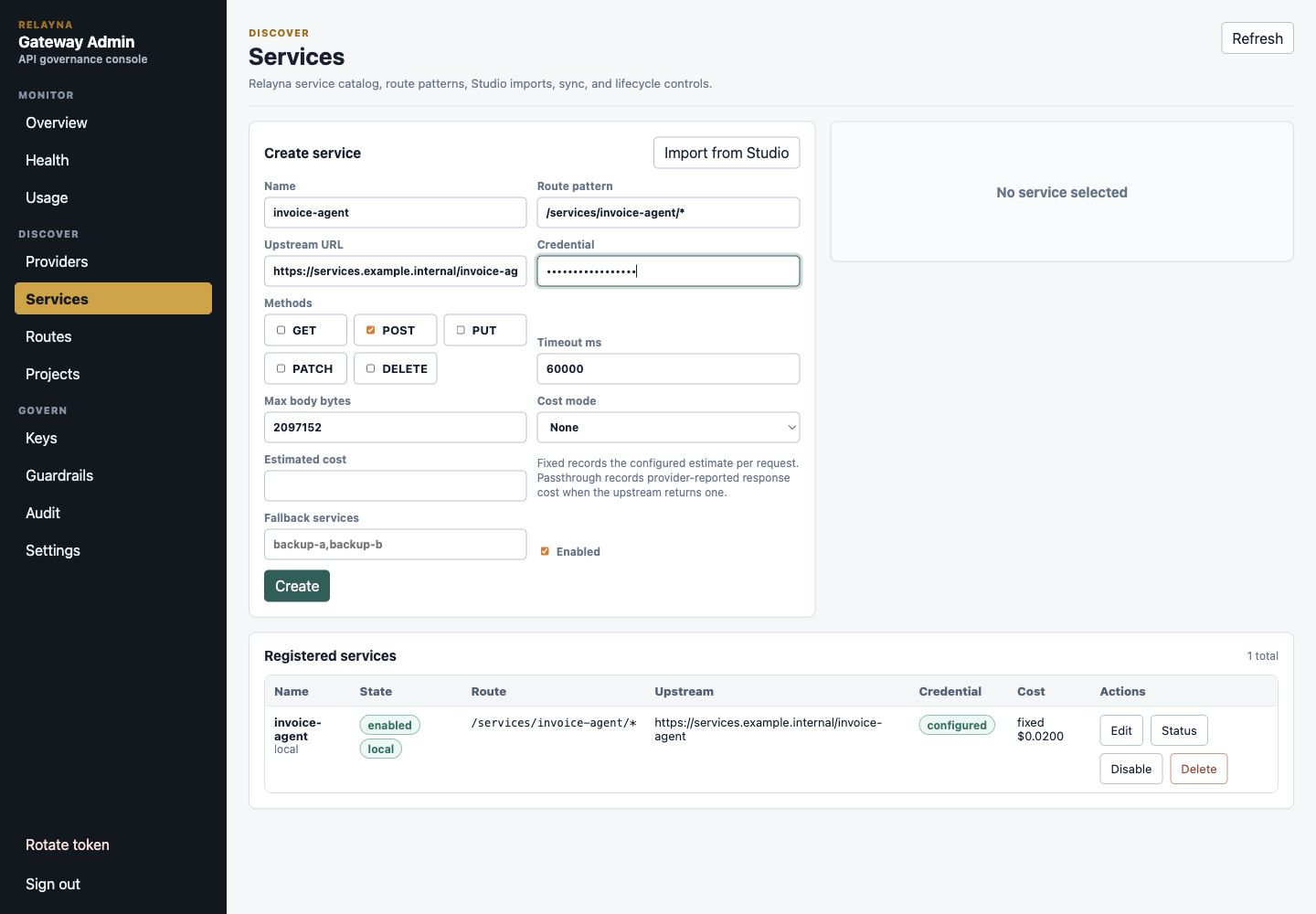
What to check: the saved service should be enabled, have the intended route
pattern, and show credential configured when a credential is required. For
Studio imports, preview changes before importing or syncing.
6. Confirm exposed routes
Open Routes. Confirm the OpenAI-compatible routes, Anthropic Claude routes, and registered service routes that clients will call.
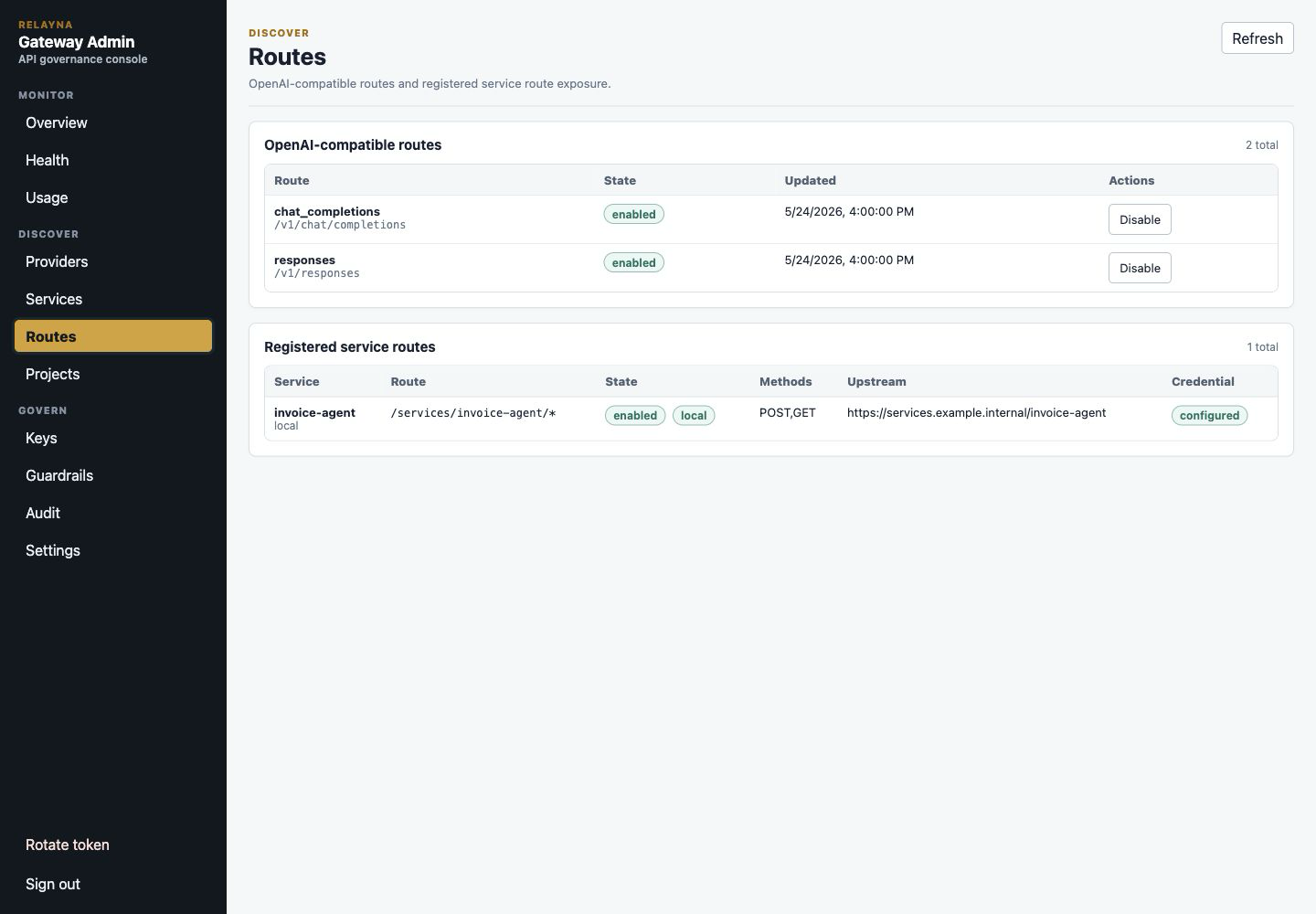
What to check: /v1/chat/completions and /v1/responses should be enabled
when clients need OpenAI-compatible traffic. /v1/messages,
/v1/messages/count_tokens, and /v1/messages/batches should be enabled when
clients need Claude or Claude Code traffic. Registered service routes should
show the expected route pattern, allowed methods, upstream, and credential
state.
Each registered service row also shows its effective Timeout ms. Operators
with service-update permission can change and save that value inline. Routes
and Services both edit the same persisted service_registrations.timeout_ms
field, so reloading either view shows the saved value. The accepted range is
1..=600000 milliseconds, and Studio re-import or sync preserves this
Gateway-owned runtime override.
When the configured upstream timeout is exhausted before response headers are
committed, Gateway returns HTTP 504 with Content-Type: application/json and
the stable upstream_timeout error envelope containing the request ID. If a
stream has already committed headers, Gateway terminates the stream instead of
trying to replace the committed response. Increasing a service timeout can
accommodate an upstream operation that is expected to take longer, but it does
not provide upstream backpressure and does not replace asynchronous task
submission for work whose completion should outlive the client request.
Each canonical OpenAI-compatible and Anthropic-compatible route also has a mode selector and direct-passthrough runtime limits:
managed_by_gatewaykeeps the full Gateway path: Relayna auth, route/model and provider policy, RPM/TPM, budgets, guardrails, provider forwarding, and full usage when provider accounting is available.direct_litellm_passthroughkeeps Relayna auth, route enablement, policy, RPM/TPM, budgets, and LiteLLM credential translation, but forwards directly to LiteLLM without Gateway guardrail rewriting or token accounting. Usage is reduced to status/latency/request metadata.Timeout ms,Max request bytes, andMax response bytesset route-level proxy limits. Defaults are120000,1048576, and1048576. Virtual-key policy fields with the same request/response semantics can still be stricter for selected keys or policy layers.
Use direct mode only for canonical OpenAI or Anthropic routes that should behave closest to LiteLLM while still preserving Gateway governance and credential isolation.
7. Create the project
Open Projects and create a project for the application, team, or environment that will own the first virtual key.
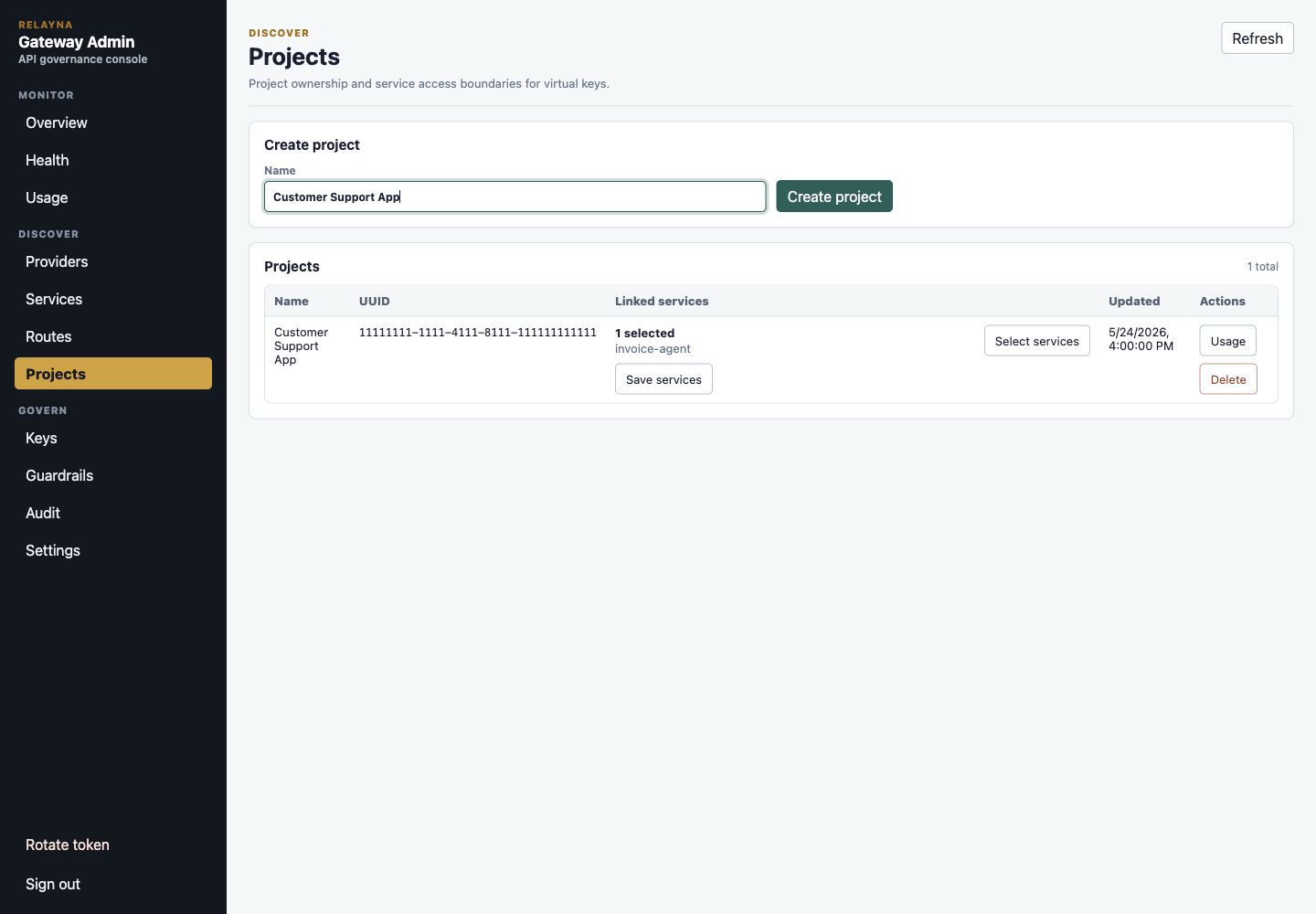
What to check: use a name admins can recognize later in usage, audit, and key ownership views. Projects are the easiest way to share service access across multiple keys for the same application.
8. Link services to the project
In the project row, open Select services, choose the services the project may
call, apply the selection, and save the project services.
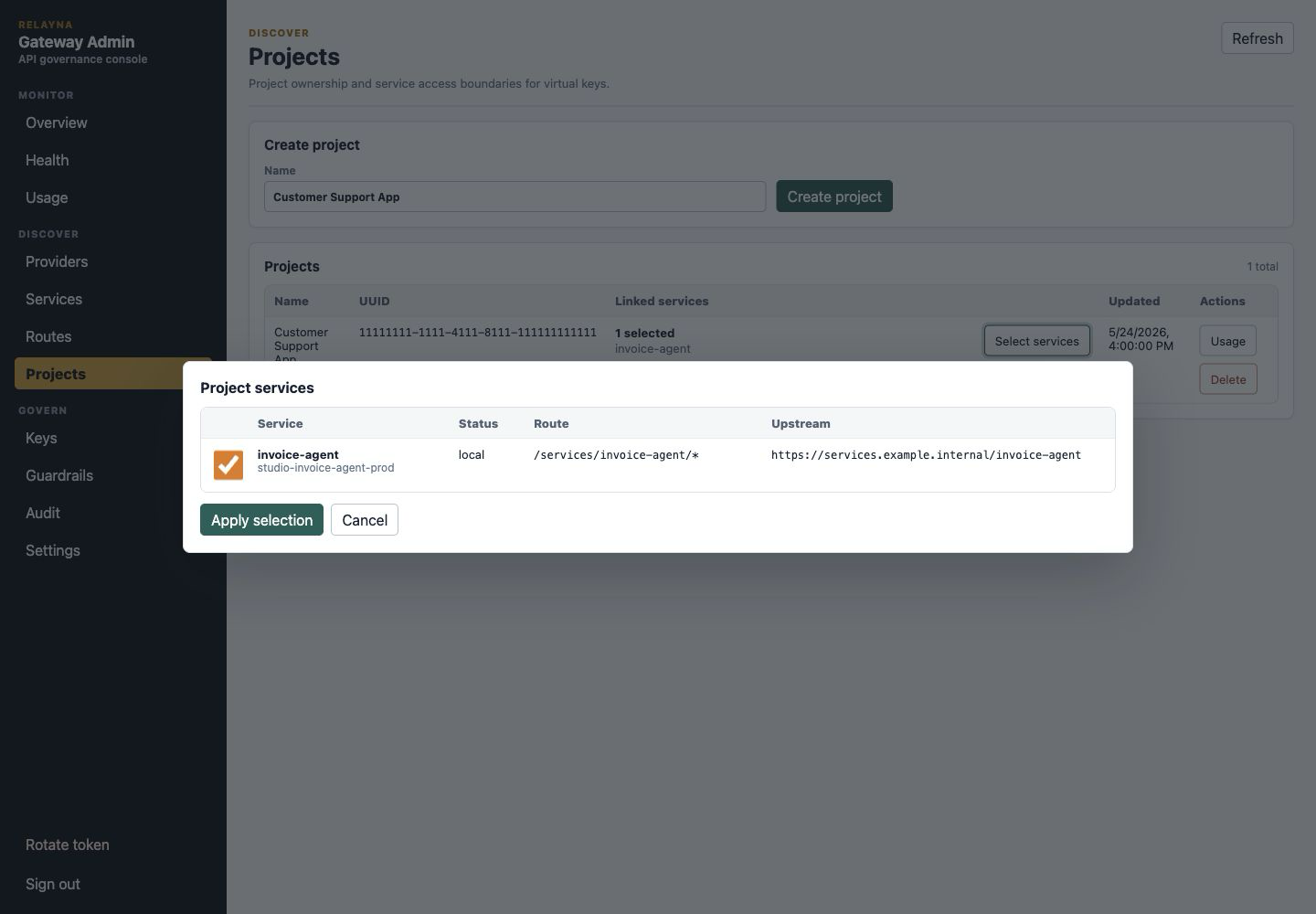
What to check: only link services that this project should be allowed to use. Project-owned keys inherit these service links, so avoid adding broad access for temporary testing.
9. Configure policy before issuing the key
Open Keys. Configure the policy directly on the key, or create an inherited policy layer first when the same limits should apply to many keys. For a first project key, set the routes, models, providers, rate limits, token limits, budgets, request/response byte limits, streaming/tools settings, allowed UTC hours, and guardrails that the application needs.
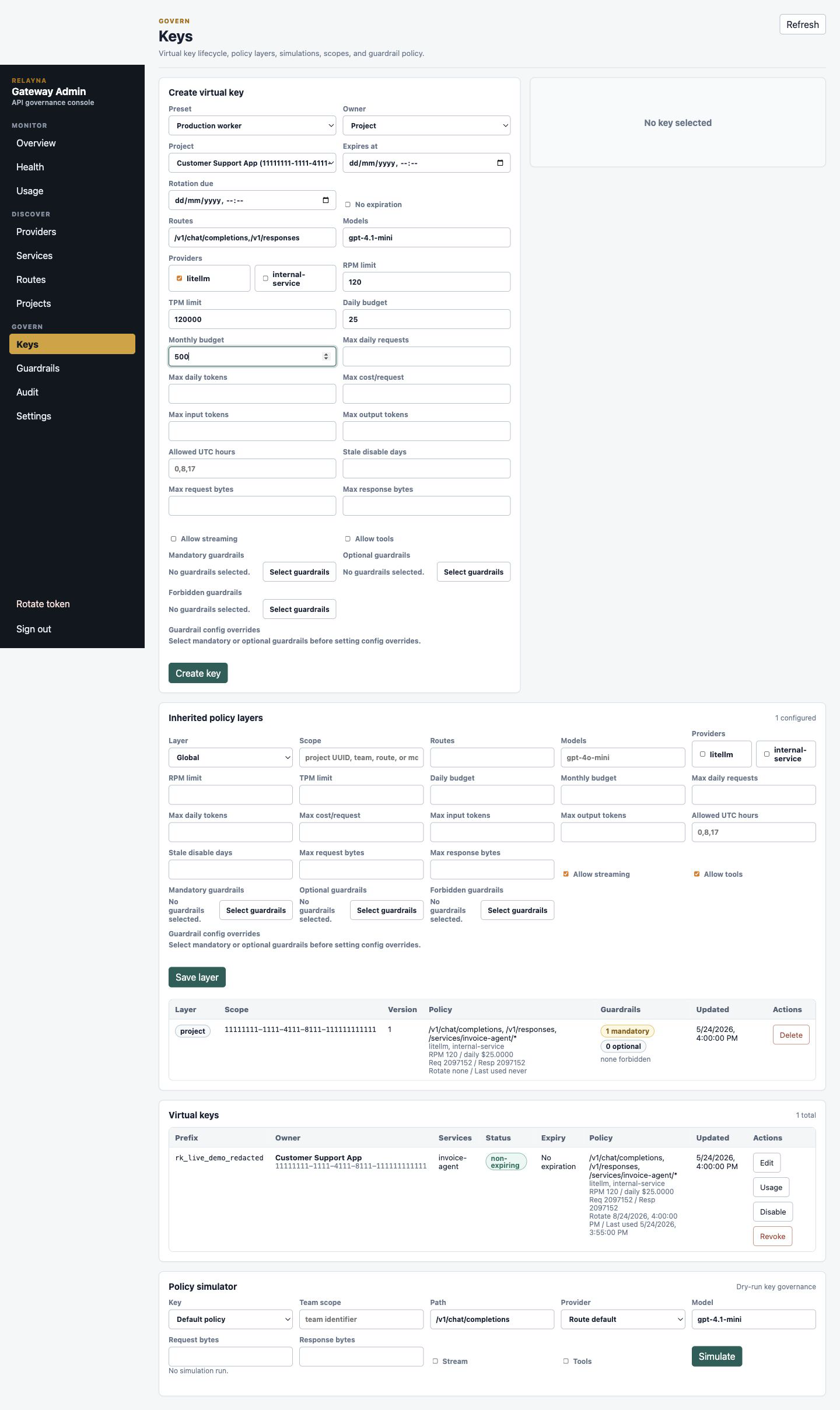
What to check: choose the narrowest route, model, provider, and service access that still supports the application. Set budgets and rate limits before handing the key to clients.
10. Create the project-owned virtual key
In Keys, keep Owner set to Project, choose the project, set expiration or
No expiration intentionally, then create the key. The raw virtual key is shown
once.
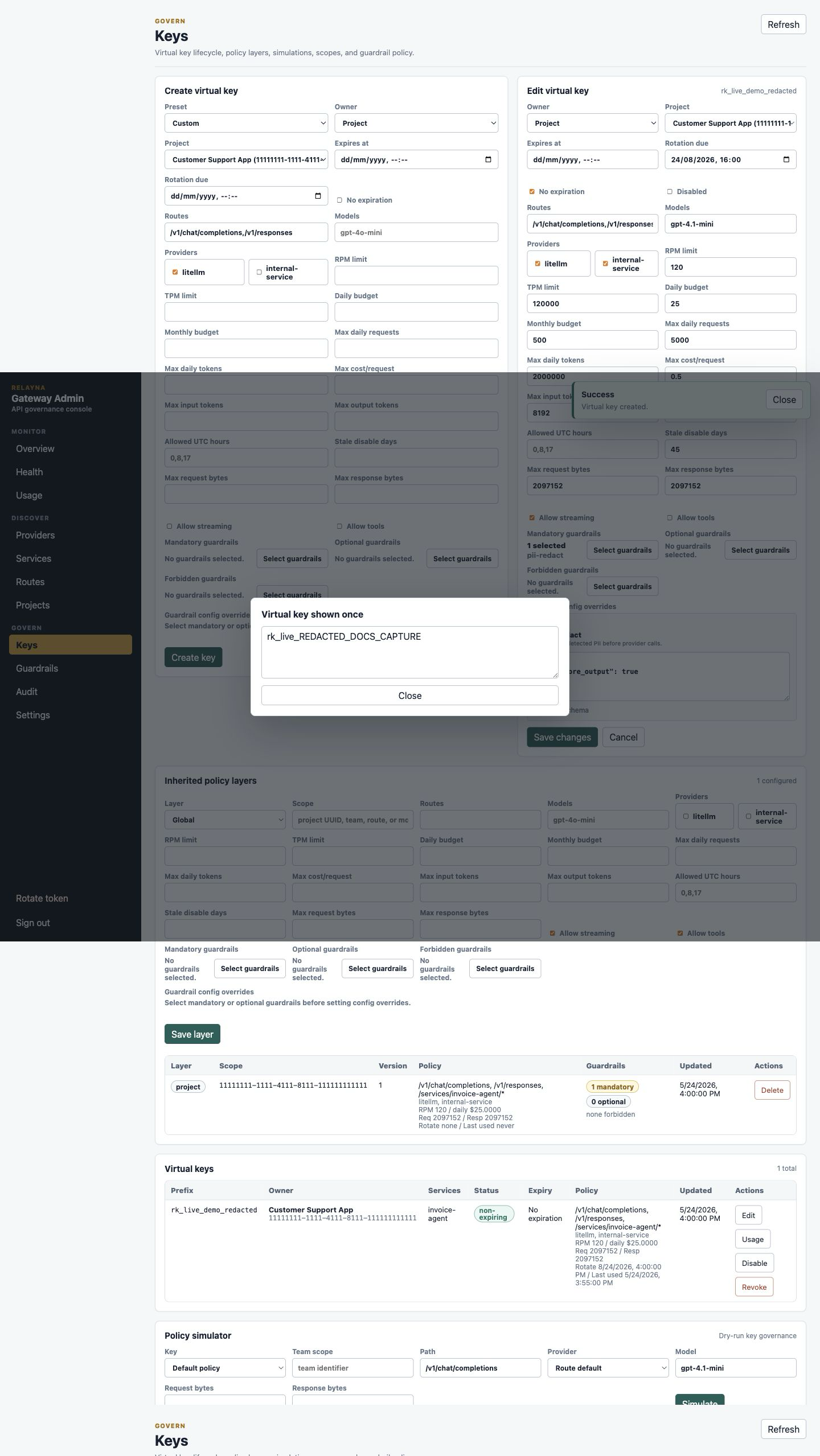
What to check: store the raw key immediately in your secret manager. After the
modal is closed, the portal only shows the key prefix. Do not paste raw
rk_live_ values into screenshots, chat, issue trackers, or logs.
11. Simulate policy before sending traffic
Use the Policy simulator on the Keys view. Select the new key, enter the route, model, provider, request size, response size, streaming, and tools settings that the application will use, then run the simulation.
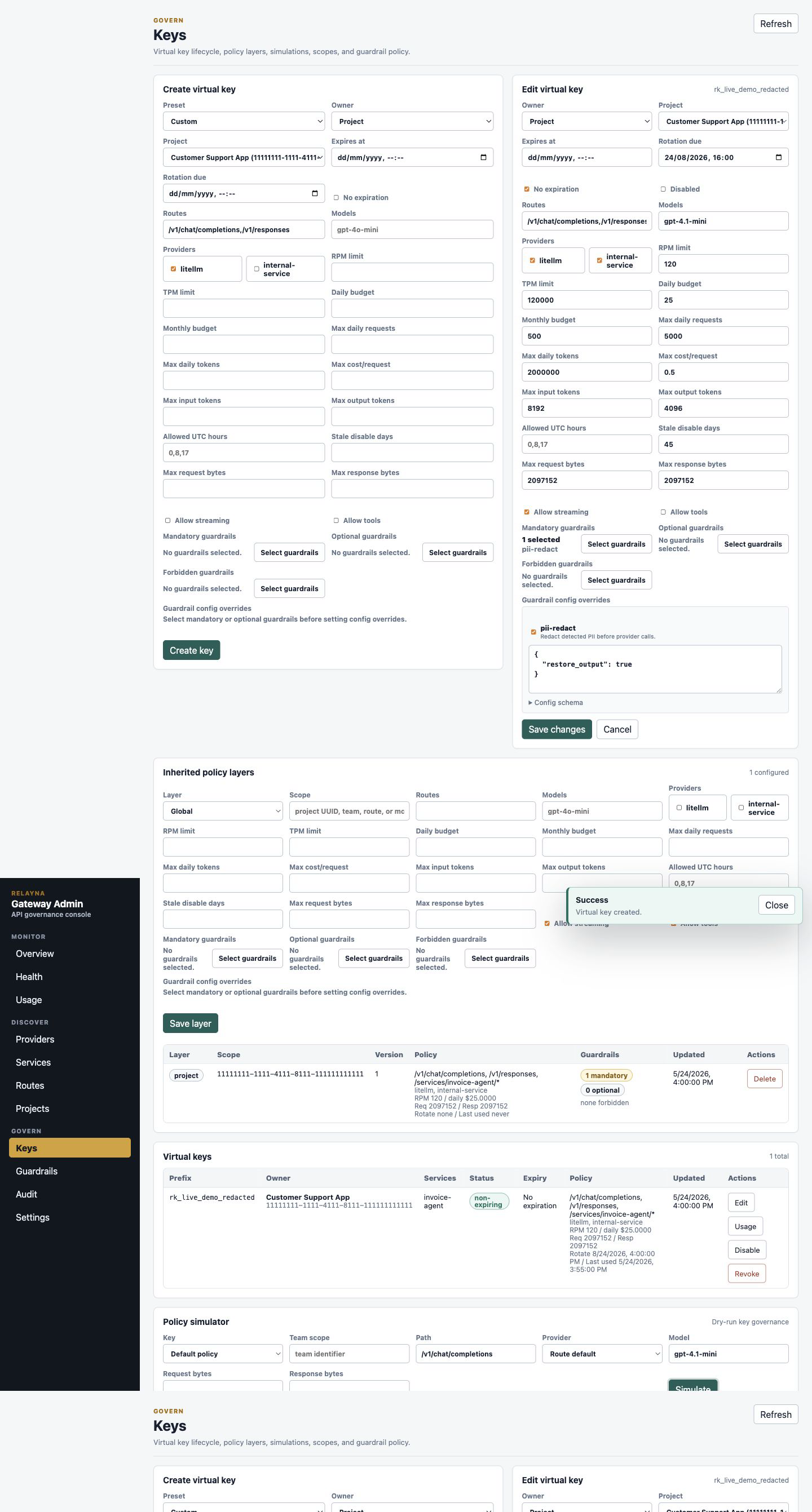
What to check: the result should allow the request and show the expected route match, provider, policy version, guardrail plan, rate-limit projection, and budget projection. Fix denials before distributing the key.
12. Verify health, usage, and audit
After setup, open Health, Usage, and Audit. Health confirms provider and service status, Usage confirms traffic and cost reporting once requests start, and Audit confirms setup actions were recorded without exposing secrets.
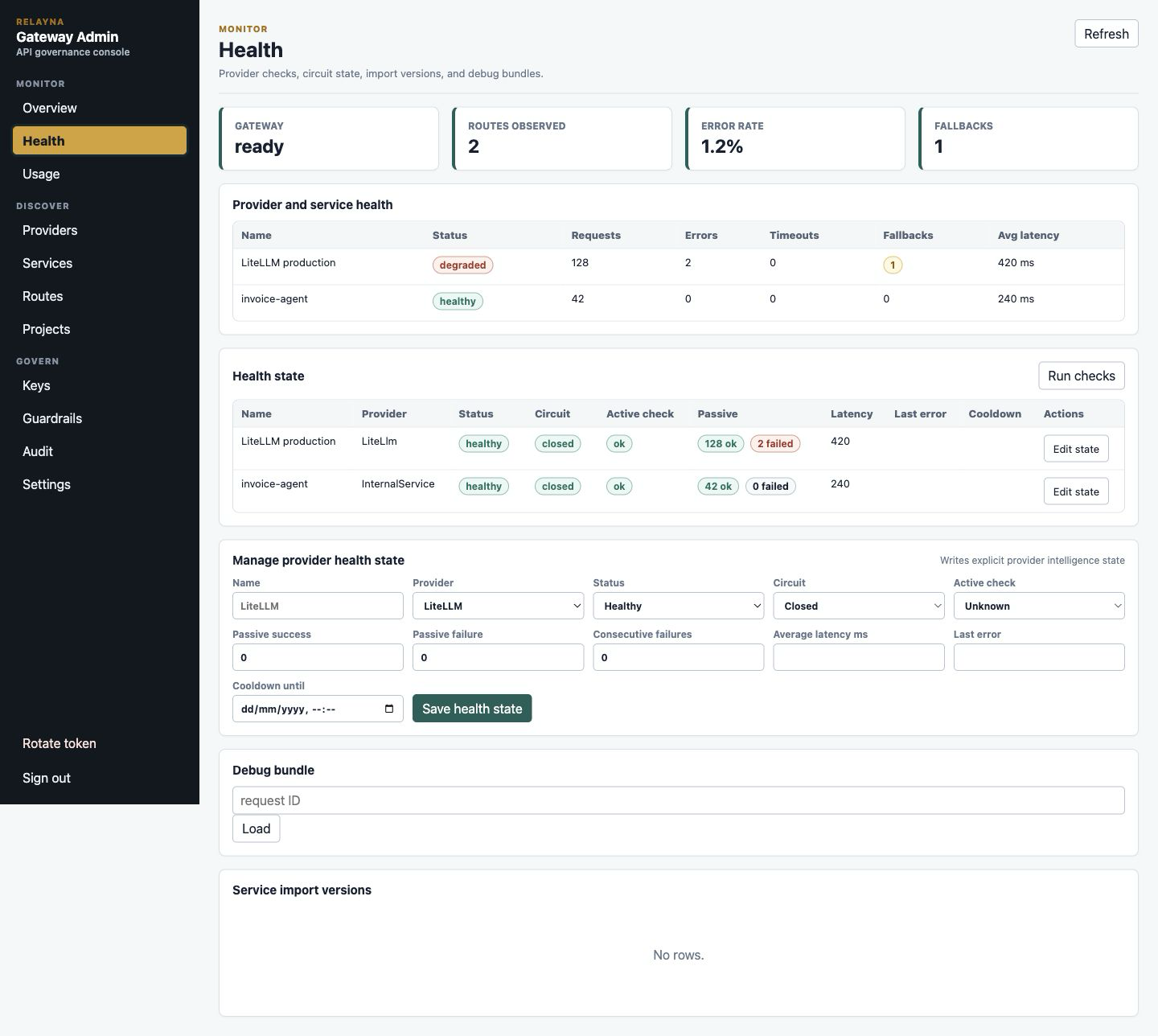
What to check: providers and services should be healthy or intentionally disabled, usage filters should show the project/key/service once requests run, and audit rows should include provider, service, project, policy, and key changes with redacted snapshots.
First-time setup is complete when:
- Provider configuration is enabled and credential status is configured.
- Required services are enabled and reachable by the gateway.
- The project is linked to only the services it needs.
- The virtual key is project-owned and stored in a secret manager.
- Policy simulation allows the intended route, model, provider, and service.
- Health, Usage, and Audit show the expected operational state.
Views
- Overview shows readiness, request count, active keys, enabled OpenAI routes, enabled services, failures, cost, and provider health.
- Projects creates and lists project UUIDs used to link services and
project-owned virtual keys. Use
Select servicesto open the service picker modal and manage a project's linked services. - Keys creates, edits, disables, enables, revokes, and inspects virtual keys.
Project-owned keys inherit service access from their selected project.
Individual keys use
Select servicesto open the service picker modal and choose services directly. UseNo expirationfor service keys whose rotation is managed outside Gateway. The key form includes safe presets for developer, production worker, read-only service, external partner, and temporary debugging keys; presets seed conservative policy limits and can be tightened before creation. Lifecycle fields show rotation due dates and last-used metadata when available. - The Keys view also includes a policy simulator. Operators can dry-run a route,
model, provider, stream/tools flags, and request/response byte projections
against a stored key or the default policy before issuing or changing access.
For registered service traffic, choose an
internal-serviceprovider or a path matching the registered service route pattern, then select the service name so service allowlists are evaluated with the same route context used by the proxy. Built-in service route patterns such as/translationand wildcard paths such as/services/<service-name>/...are both valid. The simulator blocks incomplete paths such as/services/and selected-service mismatches before sending the dry run. Simulator output reports auth source, route match, applied inherited policy layers, final intersected allowlists, guardrail plan, rate/budget projections, and final decision. When a route, provider, model, or service allowlist excludes the simulated request, the result warns which effective allowlist is restrictive. - Inherited policy layers can be managed from the Keys view. Global layers use
no scope. Project, team, route, and model layers use a scope value such as a
project UUID, team identifier, route string like
/v1/chat/completions, or model name. These layers are additive governance overlays on top of key policy and use neutral defaults unless an operator sets a field. - Providers configures LiteLLM and internal-service endpoints with write-only credentials.
- Routes disables and enables the global OpenAI-compatible LiteLLM routes
/v1/chat/completionsand/v1/responses, and lists registered service routes with their allowed methods and credential status. - Services creates, imports from Relayna Studio, syncs selected Studio catalog
entries, previews added/changed/removed/invalid import diffs, edits,
sync-checks, disables, enables, and deletes service registrations. Method
selection uses explicit checkboxes for
GET,POST,PUT,PATCH, andDELETE. Health path and method fields let operators point active checks at a service-specific endpoint when the upstream root is not a valid health target. - Usage filters usage by project, virtual key, service, route, provider, HTTP
method, effective endpoint, numeric status code, model, task ID, run ID,
trace ID, status, and minimum cost. It shows endpoint request/success/failure
breakdowns grouped as
METHOD /path, plus method, effective endpoint, and numeric status in recent rows alongside the existing cost, error, fallback, guardrail, timeseries, unused-key, task-drilldown, and export views. - Guardrails shows the gateway guardrail catalog, recent sanitized execution events, and execution summaries. Key create/edit forms can set mandatory, optional, and forbidden guardrails.
- Audit shows read-only operator audit events with filters for action, target type, target ID, operator token ID, and limit. Rows include timestamp, actor, request ID, IP/user-agent metadata, target, action, and redacted before/after snapshots.
- Health shows provider and service request, error, timeout, fallback, and latency status. Provider health state also exposes active check status, passive success/failure counters, circuit state, cooldown, and last error metadata. Operators with provider update scope can write explicit provider health state for degraded, open-circuit, cooldown, and last-error situations.
- Settings includes Studio connection controls, Entra ID and Apigee front-door auth controls, and static release/security posture references for v0.1.7 freeze boundaries and supply-chain exception guidance.
Entra ID and Apigee Front-Door Settings
Open Settings and use Entra ID and Apigee front door to manage the enterprise-auth front door from the Admin portal. These controls update the same runtime configuration that can also be supplied by deployment environment variables in Entra ID Auth and Apigee Gateway Path.
The panel shows the current auth source in the Settings summary:
unset: no Entra or Apigee front-door auth is active.environment: Gateway is using deployment environment variables.persisted: Gateway is using Admin API settings saved from the portal.
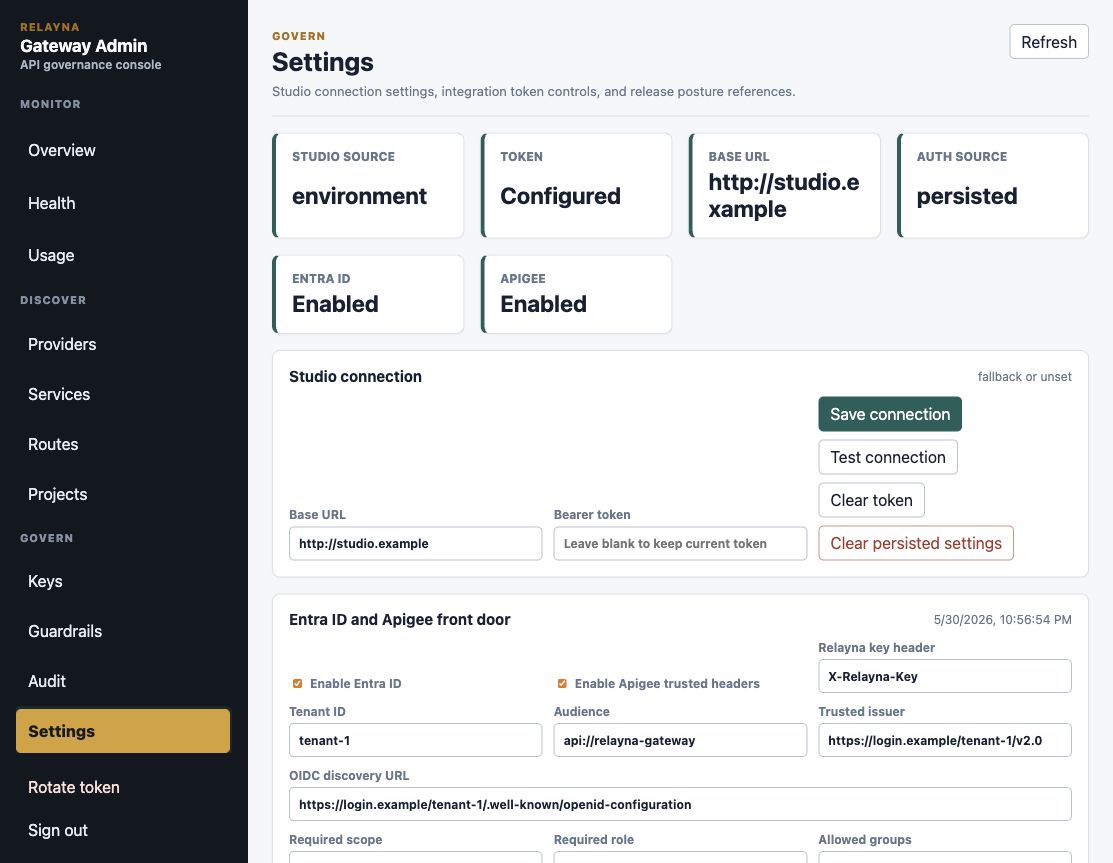
Saved Admin portal settings are applied immediately to proxy traffic. They do
not change Admin UI sign-in; /admin-ui/* remains protected by operator
tokens. Existing secret values are write-only and are never rendered back into
the browser.
Enablement and Relayna key header
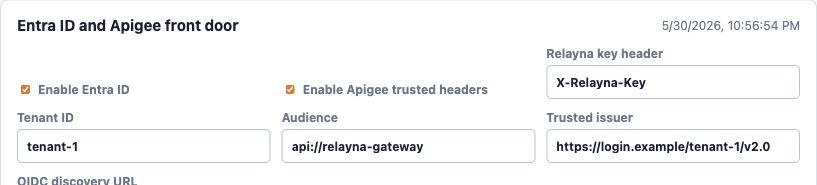
Use the first row to choose which enterprise-auth path is active and which header carries the Relayna virtual key.
| UI option | Environment variable | What it does | How to set it |
|---|---|---|---|
Enable Entra ID |
ENTRA_AUTH_ENABLED |
Requires proxy clients to send Authorization: Bearer <Entra access token> before Gateway authenticates the Relayna virtual key. |
Check it only after tenant, audience, issuer, and OIDC discovery URL are filled. Clear it to return direct proxy traffic to Relayna virtual-key auth unless Apigee trusted headers remain enabled. |
Enable Apigee trusted headers |
APIGEE_TRUSTED_HEADER_ENABLED |
Allows Apigee to send a sanitized identity header and HMAC signature instead of forwarding the original Entra JWT. | Check it only after Apigee secret is configured. Clear it to disable trusted-header verification. |
Relayna key header |
ENTRA_RELAYNA_KEY_HEADER |
Names the HTTP header that carries the Relayna rk_live_... key when Entra or Apigee front-door auth is used. |
Keep X-Relayna-Key unless clients and Apigee policies are already updated to a different valid HTTP header name. Gateway strips this header before upstream forwarding. |
When Entra is enabled, clients send:
Authorization: Bearer <Entra access token>
X-Relayna-Key: rk_live_...
When Apigee trusted headers are enabled, Gateway expects Apigee to send:
X-Apigee-Entra-Identity: <base64url-json>
X-Apigee-Entra-Signature: <base64url-hmac-sha256>
X-Relayna-Key: rk_live_...
Entra issuer and discovery settings
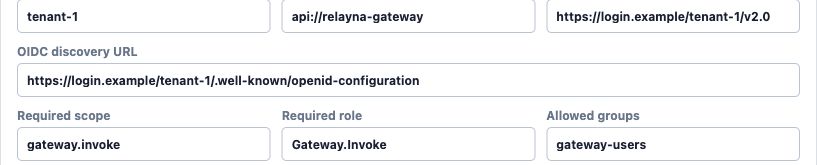
These fields identify the Entra tenant and the API registration Gateway should
trust. They are required when Enable Entra ID is checked.
| UI option | Environment variable | What it does | How to set it |
|---|---|---|---|
Tenant ID |
ENTRA_TENANT_ID |
Matches the token tid claim. |
Use the tenant GUID or tenant identifier that appears in issued access tokens. |
Application ID / token audience |
ENTRA_APPLICATION_ID at startup; persisted audience at runtime |
Matches the token aud claim for the shared Relayna Gateway application. |
For Microsoft identity platform v2 tokens, use the application ID GUID. Managed identities request api://<application-id>/.default, but the issued token's aud is the GUID. |
Trusted issuer |
ENTRA_ISSUER |
Matches the token iss claim and the OIDC metadata issuer. |
For Microsoft identity platform v2 tokens, use https://login.microsoftonline.com/<tenant-id>/v2.0. |
OIDC discovery URL |
ENTRA_OIDC_DISCOVERY_URL |
Lets Gateway fetch OIDC metadata and find the JWKS URI used for JWT signature validation. | Use the tenant's .well-known/openid-configuration URL. For v2 tokens, it normally ends with /v2.0/.well-known/openid-configuration. |
Saving with Entra enabled and any required field empty is rejected. Saving an empty field while Entra is disabled clears that persisted field.
Authorization requirements

These options are optional authorization gates layered on top of tenant, issuer, audience, and signature validation. If more than one is set, the token or trusted Apigee identity must satisfy each configured requirement.
| UI option | Environment variable | What it does | How to set it |
|---|---|---|---|
Required scope |
ENTRA_REQUIRED_SCOPE |
Requires the delegated scope to appear in the Entra scp claim. Apigee trusted-header mode checks the same value against the signed identity scopes. |
Use a single scope value such as gateway.invoke. Leave blank when only app roles or groups are used. |
Required role |
ENTRA_REQUIRED_ROLE |
Requires an app role to appear in the Entra roles claim. Apigee trusted-header mode checks the same value against the signed identity roles. Startup configuration defaults to gateway.invoke. |
Use gateway.invoke for governed request-plane callers. Override it only when the shared application defines a reviewed equivalent role. |
Allowed groups |
ENTRA_ALLOWED_GROUPS |
Requires at least one configured group to appear in the Entra groups claim or signed Apigee identity groups. |
Enter a comma-separated list of group IDs. Leave blank to skip group authorization. Entra group-overage tokens fail closed. |
JWT validation, cache, and clock settings

These options control how Gateway validates Entra JWTs after it resolves OIDC metadata and JWKS keys.
| UI option | Environment variable | What it does | How to set it |
|---|---|---|---|
Accepted algorithms |
ENTRA_ACCEPTED_ALGORITHMS |
Limits accepted JWT signing algorithms. Gateway currently validates RSA JWKS keys. | Enter a comma-separated list. Use RS256 unless your Entra setup intentionally issues another supported RSA algorithm. Empty values fall back to RS256. |
JWKS cache TTL |
ENTRA_JWKS_CACHE_TTL_SECONDS |
Sets how long Gateway caches fetched JWKS keys. Unknown kid values trigger a refresh before the request fails. |
Enter seconds. The default is 300. Use shorter values during key-rotation testing and longer values only when rotation policy allows it. |
Clock skew seconds |
ENTRA_CLOCK_SKEW_SECONDS |
Allows bounded skew when validating exp, nbf, and iat claims. |
Enter seconds. The default is 60. Set to 0 only when all callers and Gateway hosts have tightly synchronized clocks. |
Apigee secret and actions

Use the Apigee secret when Enable Apigee trusted headers is checked. Gateway
uses it to verify X-Apigee-Entra-Signature, which must be the unpadded
base64url HMAC-SHA256 of the exact X-Apigee-Entra-Identity header value.
| UI option | Environment variable | What it does | How to set it |
|---|---|---|---|
Apigee secret |
APIGEE_TRUSTED_HEADER_SECRET |
Shared HMAC secret used to verify signed Apigee identity headers. | Paste a high-entropy secret when enabling or rotating trusted-header mode. Leave the field blank to keep the current persisted secret. The current secret is never displayed. |
Save auth settings |
Admin API PATCH /admin-ui/admin/auth/front-door |
Persists the current form and applies it to the runtime auth snapshot. | Save after changing toggles, Entra fields, Relayna key header, authorization requirements, validation settings, or the Apigee secret. |
Clear Apigee secret |
Admin API PATCH /admin-ui/admin/auth/front-door |
Clears the persisted Apigee secret and disables trusted-header mode. | Use before decommissioning Apigee trusted-header mode or after a suspected secret exposure. Re-enter a new secret before enabling trusted headers again. |
For Apigee signed-header mode, Apigee must remove any inbound user-supplied
X-Apigee-Entra-Identity, X-Apigee-Entra-Signature, and Relayna key headers
before setting its own values. Gateway strips the Apigee proof headers and the
configured Relayna key header before forwarding traffic to LiteLLM, direct
providers, or registered services.
Security Notes
- The portal never receives provider credentials or LiteLLM service keys.
- Raw virtual keys and operator tokens are shown once.
- Provider and service credentials can be configured, replaced, or cleared, but existing secret values are not displayed.
- Studio import reads catalog metadata only. Gateway preserves local credentials, enabled state, route overrides, limits, fallback services, project links, and cost settings on re-import.
- Disabling an OpenAI route is global and affects every virtual key until the route is enabled again.
- Service wildcard routes can accept
GETonly when the service registration includesGETin its allowed methods. - Guardrail execution records never include raw request bodies, response bodies, provider credentials, bearer tokens, or PII mappings.
- Debug bundles are keyed by request ID and contain route, selection, policy, guardrail, latency, fallback, and request/response hash data only. They do not contain raw prompts, raw responses, bearer tokens, provider credentials, or LiteLLM credentials.
- The control listener should be protected by network policy, ingress rules, or private access controls in production.
Audit Events
Admin mutations write append-only audit events with the operator token ID,
action, target type, target ID when available, before/after JSON snapshots when
safe, request ID, IP, user agent, and timestamp. Audit rows are available to
operators with audit:read:
curl -sS \
  -H "Authorization: Bearer $GATEWAY_OPERATOR_TOKEN" \
  "http://127.0.0.1:8081/admin-ui/admin/audit-events?limit=100"
Audit snapshots must not contain raw virtual keys, operator tokens, provider credentials, LiteLLM credentials, internal service tokens, prompts, or full provider responses.
Usage Export
Operators can export usage rows through admin-token-protected endpoints:
curl -sS \
  -H "Authorization: Bearer $GATEWAY_OPERATOR_TOKEN" \
  "http://127.0.0.1:8081/admin-ui/admin/usage/export.json?status=success&limit=1000"

curl -sS \
  -H "Authorization: Bearer $GATEWAY_OPERATOR_TOKEN" \
  "http://127.0.0.1:8081/admin-ui/admin/usage/export.csv?status=failure&limit=1000"
Supported filters match the usage dashboard query model: from, to,
project_id, key_id, route, provider, service, task_id, run_id,
method, endpoint, status_code, model, status, trace_id, and
min_cost_usd. Export rows are ordered by
creation time and request ID. limit defaults to 1000, is clamped to
10000, and offset can be used for pagination.
JSON exports include a summary object plus rows. CSV exports include the row
fields directly and neutralize spreadsheet formula prefixes before escaping
cells. Summary responses include request, success, failure, token, cost,
latency, fallback, denial, guardrail block, expensive request, and fallback-rate
fields. Row responses include request, key, project, route, model, provider,
status, latency, token, cost, service, HTTP method, concrete endpoint path,
matched endpoint template, task ID, run ID, trace ID, fallback, guardrail action
count, and creation timestamp fields. The three endpoint columns are appended
to CSV output so existing column positions remain stable.
Unused keys are available at:
curl -sS \
  -H "Authorization: Bearer $GATEWAY_OPERATOR_TOKEN" \
  "http://127.0.0.1:8081/admin-ui/admin/usage/unused-keys?limit=100"
Usage reads require usage:read. JSON and CSV exports require usage:export.
Guardrails
Gateway guardrails are configured by operators and enforced by virtual-key
policy. pii-redact is seeded as an opt-in built-in guardrail. Add it to a
key's mandatory_guardrails to apply it even when clients omit the
guardrails request field, or add it to optional_guardrails to let callers
request it explicitly.
The Guardrails view manages the global catalog. Use New guardrail to add a
custom HTTP guardrail, or select an existing row to open the detail drawer.
Built-ins such as pii-redact allow safe edits to enabled state, modes, failure
policy, schema, and runtime config. Built-ins do not expose endpoint, token, or
delete controls. Custom HTTP guardrails expose endpoint URL, timeout, and
write-only bearer token controls.
Catalog config has two fields with different jobs:
config_schemadocuments the expected JSON shape for operators.runtime_configis the actual global default config passed to the guardrail when it executes.
For pii-redact, runtime_config can include restore_output. When true,
post-call guardrails restore request-local placeholders before redacting any new
PII generated by the provider. When false, placeholders remain redacted in the
final response.
Key create and edit forms configure how the catalog applies to each virtual key:
- Mandatory guardrails always run for that key.
- Optional guardrails are allowed for client-requested use.
- Forbidden guardrails are hidden from client discovery and rejected if requested.
- Guardrail config overrides tune selected guardrails only for that key.
The Admin portal shows per-key override editors only after a guardrail is selected as mandatory or optional. This keeps unselected catalog entries out of the key form and makes the execution rule explicit: an override is dormant until that guardrail is actually applied.
Example key policy with per-key config:
{
  "guardrail_policy": {
    "mandatory_guardrails": ["pii-redact"],
    "optional_guardrails": ["custom-check"],
    "forbidden_guardrails": [],
    "guardrail_config_overrides": {
      "pii-redact": {
        "restore_output": false
      },
      "custom-check": {
        "threshold": 0.85
      }
    }
  }
}
Effective config is a shallow JSON object merge:
effective_config = catalog runtime_config + key guardrail_config_overrides[name]
Unknown override guardrails, forbidden override guardrails, and non-object override values are rejected with stable guardrail error envelopes. HTTP guardrail endpoint URL, timeout, and bearer token remain catalog-level provider settings; per-key overrides only tune runtime config.
Policy and Size Limits
Virtual-key policy is evaluated as an effective policy. Global and project layers combine with team, key, route, and model layers when the relevant context is present. They use the same deterministic rules:
- Explicit deny wins.
- Route, model, provider, service, and allowed-hour lists intersect. A disjoint intersection denies the request.
- Lower-level rate, budget, cost, token, and byte limits can only become stricter.
- Streaming and tool permissions are only allowed when every applied layer allows them.
- Mandatory guardrails are additive. Forbidden guardrails remove optional requests.
Use the policy simulator after saving global or project layers. If a global
layer is intended only for internal services, it will also restrict
OpenAI-compatible LiteLLM keys unless the final intersected route and provider
allowlists still include /v1/chat/completions and litellm.
Request body limits return request_body_too_large. Response body limits return
response_body_too_large. Both use the standard structured error envelope and
HTTP 413 status.
Policy layer APIs:
curl -sS \
  -H "Authorization: Bearer $GATEWAY_OPERATOR_TOKEN" \
  http://127.0.0.1:8081/admin-ui/admin/policy-layers

curl -sS \
  -H "Authorization: Bearer $GATEWAY_OPERATOR_TOKEN" \
  -H "Content-Type: application/json" \
  -X POST http://127.0.0.1:8081/admin-ui/admin/policy-layers \
  -d '{
    "kind": "route",
    "scope_id": "/v1/chat/completions",
    "policy": {
      "max_response_body_bytes": 1048576,
      "allow_streaming": true,
      "allow_tools": true
    }
  }'
Operator APIs:
curl -sS \
  -H "Authorization: Bearer $GATEWAY_OPERATOR_TOKEN" \
  http://127.0.0.1:8081/admin-ui/admin/guardrails

curl -sS \
  -H "Authorization: Bearer $GATEWAY_OPERATOR_TOKEN" \
  "http://127.0.0.1:8081/admin-ui/admin/guardrails/executions?limit=50"

curl -sS \
  -H "Authorization: Bearer $GATEWAY_OPERATOR_TOKEN" \
  http://127.0.0.1:8081/admin-ui/admin/guardrails/summary
Client discovery and test APIs use Relayna virtual keys:
curl -sS \
  -H "Authorization: Bearer rk_live_xxx" \
  http://127.0.0.1:8081/admin-ui/v1/guardrails

curl -sS \
  -H "Authorization: Bearer rk_live_xxx" \
  -H "Content-Type: application/json" \
  -X POST http://127.0.0.1:8081/admin-ui/v1/guardrails/test \
  -d '{"guardrails":["pii-redact"],"mode":"pre_call","input":{"messages":[{"role":"user","content":"email alice@example.com"}]}}'
Custom HTTP guardrails can be added through the admin API. Gateway sends a
sanitized JSON payload with request_id, guardrail, mode, context,
config, and one of request or response. The provider returns action,
optional modified request or response, optional reason, and sanitized
metadata.
curl -sS \
  -H "Authorization: Bearer $GATEWAY_OPERATOR_TOKEN" \
  -H "Content-Type: application/json" \
  -X POST http://127.0.0.1:8081/admin-ui/admin/guardrails \
  -d '{
    "name": "custom-check",
    "description": "Company policy check",
    "endpoint_url": "https://guardrails.example/check",
    "modes": ["pre_call", "post_call", "during_call"],
    "failure_policy": "fail_open",
    "timeout_ms": 1500,
    "bearer_token": "secret-token"
  }'
Streaming requests with guarded responses require selected response guardrails
to support during_call. pii-redact redacts common PII in streaming chunks
with a small holdback window for values split across chunks. If a required
guardrail cannot run during streaming, Gateway fails closed with
guardrail_unavailable.
Import From Studio
Relayna Studio owns the operator-facing service catalog. Relayna Gateway owns public traffic authentication, policy, route matching, upstream credential injection, usage, costs, budgets, and fail-closed routing. The import flow copies Studio catalog metadata into Gateway service registrations; it does not copy provider credentials or allow Studio metadata to bypass Gateway policy.
Configure the Studio backend in Admin portal Settings, or set
RELAYNA_STUDIO_BASE_URL as a deployment fallback. Use the Studio backend base
URL, not the frontend URL. Gateway appends /studio/gateway/services when it
fetches the catalog. Admin-saved settings override environment settings until
the persisted base URL is cleared, at which point the environment fallback is
effective again.
Local example:
export RELAYNA_STUDIO_BASE_URL="http://127.0.0.1:8000"
Docker on macOS or Windows when Studio runs on the host:
export RELAYNA_STUDIO_BASE_URL="http://host.docker.internal:8000"
Kubernetes example when Studio is another Service in the same namespace:
export RELAYNA_STUDIO_BASE_URL="http://relayna-studio-backend:8000"
If Studio protects the Gateway export endpoint, set the optional bearer token in
Admin portal Settings or with RELAYNA_STUDIO_TOKEN. Gateway sends it as:
Authorization: Bearer <RELAYNA_STUDIO_TOKEN>
Gateway expects GET /studio/gateway/services to return JSON with a top-level
services array. Each row should include studio_service_id or service_id, a
gateway-safe name or gateway_service_name, optional display_name,
base_url, environment, status, tags, optional allowed_methods, optional
default_route_pattern, and optional pricing hints. A minimal response looks
like this:
{
  "services": [
    {
      "studio_service_id": "payments-api",
      "name": "payments-api",
      "display_name": "Payments API",
      "base_url": "https://payments.example.test",
      "environment": "prod",
      "tags": ["core", "billing"],
      "status": "healthy",
      "default_route_pattern": "/services/payments-api/*"
    }
  ]
}
Before opening the Gateway Admin portal, test Studio directly:
curl -sS "$RELAYNA_STUDIO_BASE_URL/studio/gateway/services"
Then test the Gateway-to-Studio connection through Admin portal Settings or the protected Gateway admin route:
curl -sS \
  -H "Authorization: Bearer $GATEWAY_OPERATOR_TOKEN" \
  -X POST \
  http://127.0.0.1:8081/admin-ui/admin/studio/connection/test

curl -sS \
  -H "Authorization: Bearer $GATEWAY_OPERATOR_TOKEN" \
  http://127.0.0.1:8081/admin-ui/admin/studio/services
The test route returns ok and service_count when the catalog is reachable.
The services route returns the mapped import preview used by the portal. It
should show studio_service_id, name, route_pattern, and an
import_request for each service. If Studio is unreachable, stalls, returns
non-JSON, or returns an invalid service shape, Gateway returns
studio_unavailable.
Operator flow:
- Start Studio backend and verify
/studio/gateway/services. - Start Gateway with optional
RELAYNA_STUDIO_BASE_URLandRELAYNA_STUDIO_TOKEN, or configure the connection in Admin Settings. - Open
/admin-ui, sign in with the Gateway operator token, and go to Settings. - Save or test the Studio connection. Token values are write-only and are never returned by the API.
- Go to Services and click
Import from Studio. - Select one or more services and click
Import selected. - Configure Gateway-owned runtime fields such as credentials, enabled state, route overrides, limits, fallback services, project links, and cost mode.
Imported services are created with source = studio. They remain disabled or
incomplete until Gateway-owned runtime fields are configured. Re-importing by
studio_service_id is idempotent and preserves Gateway-owned fields by default.
For routed traffic, wildcard service aliases subtract the matched prefix before forwarding upstream. For example:
Gateway route pattern: /services/payments-api/*
Client request:        POST /services/payments-api/charges?trace=1
Upstream receives:     POST /charges?trace=1
Exact route patterns do not subtract a prefix. A route pattern of /charges
forwards /charges as /charges.
Non-Expiring Virtual Keys
Virtual keys can be created or edited with no expiration date. In the Admin
portal, open Keys and select No expiration in the create or edit form. Through
the Admin API, send expires_at: null. Project-owned keys specify
owner_type: "project" and a project_id:
curl -sS -X POST http://127.0.0.1:8081/admin-ui/admin/keys \
  -H "Authorization: Bearer $GATEWAY_OPERATOR_TOKEN" \
  -H "Content-Type: application/json" \
  -d '{
    "owner_type": "project",
    "project_id": "<project-id>",
    "expires_at": null,
    "policy": {
      "allowed_routes": ["/services/*"],
      "allowed_providers": ["internal-service"]
    }
  }'
Individual keys specify owner_type: "individual" and direct service_names:
curl -sS -X POST http://127.0.0.1:8081/admin-ui/admin/keys \
  -H "Authorization: Bearer $GATEWAY_OPERATOR_TOKEN" \
  -H "Content-Type: application/json" \
  -d '{
    "owner_type": "individual",
    "service_names": ["payments-api"],
    "expires_at": null,
    "policy": {
      "allowed_routes": ["/services/*"],
      "allowed_providers": ["internal-service"]
    }
  }'
To clear expiration on an existing key:
curl -sS -X PATCH http://127.0.0.1:8081/admin-ui/admin/keys/<key-id> \
  -H "Authorization: Bearer $GATEWAY_OPERATOR_TOKEN" \
  -H "Content-Type: application/json" \
  -d '{"expires_at": null}'
To set an expiration again:
curl -sS -X PATCH http://127.0.0.1:8081/admin-ui/admin/keys/<key-id> \
  -H "Authorization: Bearer $GATEWAY_OPERATOR_TOKEN" \
  -H "Content-Type: application/json" \
  -d '{"expires_at": "2030-01-01T00:00:00Z"}'
Warning: non-expiring keys are long-lived bearer credentials. Anyone with the raw key can use it until it is revoked, disabled, or restricted by policy. Use non-expiring keys only for service-to-service integrations with external rotation controls, narrow route/provider/service policy, secret-manager storage, audit coverage, and a documented revocation procedure. Prefer expiring keys for human users, temporary automation, demos, and CI jobs.
Cost Modes
fixed records the configured estimate on each routed service request. For example, a service with estimated_cost_usd set to 0.01 contributes $0.0100 per recorded request.
passthrough records the cost reported by the upstream response when present, such as usage.total_cost or LiteLLM response-cost fields. If the provider omits cost data, the usage event has no per-request cost and aggregate summaries treat missing cost as zero.